
Laravel Job Queue for Async AI Processing at Scale
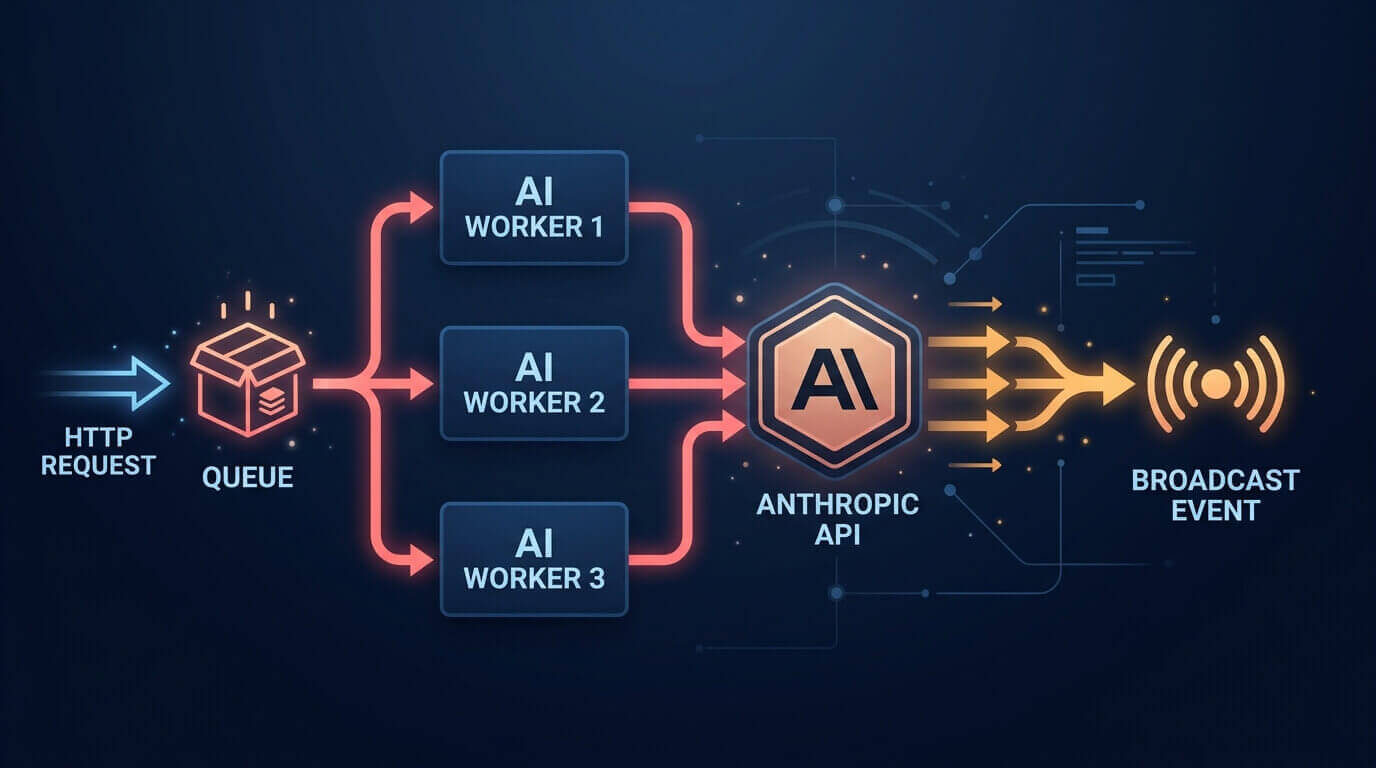
The first time I shipped a feature that called an AI API synchronously from a web request, I wasn't thinking about load. I was thinking about whether the output was good enough. Three days later, a batch of users hit the feature simultaneously, and the dashboard went from responsive to a spinning wheel. Every user sat there waiting 8–12 seconds for a response the server was holding a thread for. The queue existed. I just hadn't used it.
Async AI processing isn't optional once you're past toy volume. Here's how to do it properly with Laravel's official AI package.
Why Sync AI Calls Are a Dead End
A typical Claude or GPT-4o completion takes 2–8 seconds depending on context length and model. At one concurrent user, that's annoying but survivable. At ten users hitting the same endpoint simultaneously, your PHP-FPM workers pile up waiting for API responses. At a hundred, you're dropping connections.
The deeper issue: AI API latency isn't predictable. A model that responds in 2 seconds on most requests will occasionally take 20. If your PHP timeout is 30 seconds, you've just burned a worker for half a minute on a single response.
Queuing decouples the AI call from the HTTP cycle completely. The user gets a response immediately, the job runs when a worker is free, and you can retry failures without the user ever knowing anything went wrong.
Setting Up the Laravel AI Package
composer require laravel/ai
php artisan ai:install
The installer publishes config/ai.php. Add your provider credentials to .env:
ANTHROPIC_API_KEY=your-key-here
Define an agent class. The Promptable trait wires up queue and streaming support automatically — you don't implement either manually:
<?php

namespace App\Ai;

use Laravel\Ai\Contracts\Agent;
use Laravel\Ai\Attributes\Provider;
use Laravel\Ai\Attributes\Model;
use Laravel\Ai\Attributes\MaxTokens;
use Laravel\Ai\Attributes\Temperature;
use Laravel\Ai\Attributes\Timeout;
use Laravel\Ai\Enums\Lab;
use Laravel\Ai\Promptable;

#[Provider(Lab::Anthropic)]
#[Model('claude-sonnet-4-6')]  // or claude-opus-4-8 for complex documents
#[MaxTokens(2048)]
#[Temperature(0.3)]
#[Timeout(90)]
class ContentSummarizerAgent implements Agent
{
    use Promptable;

    public function instructions(): string
    {
        return 'You are a technical content summarizer. '
            . 'Return concise, accurate summaries in plain text. '
            . 'No markdown. No preamble. No meta-commentary.';
    }
}
The #[Timeout(90)] attribute is worth setting explicitly. The SDK default is often too short for longer documents, and a silent timeout leaves you debugging a job that didn't fail — it just never finished.
The Built-In Queue Method
Most people miss this. The Promptable trait ships with a .queue() method that dispatches the AI call to your queue without you writing a job class:
(new ContentSummarizerAgent)
    ->queue("Summarize this article: {$article->body}")
    ->then(function ($response) use ($article) {
        $article->update(['summary' => $response->text]);
    });
One line to dispatch. The .then() callback runs inside the queued job context after the AI call completes.
That's enough for simple cases. It stops being enough when you need structured logging, specific retry behavior, broadcasting results back to a specific user, or tracking job state in your database. For production systems, you want a custom job class.
Custom Jobs Give You Control
<?php

namespace App\Jobs;

use App\Ai\ContentSummarizerAgent;
use App\Events\ArticleSummarized;
use App\Models\Article;
use Illuminate\Bus\Queueable;
use Illuminate\Contracts\Queue\ShouldQueue;
use Illuminate\Foundation\Bus\Dispatchable;
use Illuminate\Queue\InteractsWithQueue;
use Illuminate\Queue\SerializesModels;
use Illuminate\Support\Facades\Log;

class SummarizeArticleJob implements ShouldQueue
{
    use Dispatchable, InteractsWithQueue, Queueable, SerializesModels;

    public int $tries = 3;
    public int $timeout = 120;
    public bool $failOnTimeout = true;
    public array $backoff = [10, 30, 60];

    public function __construct(
        public readonly Article $article,
    ) {}

    public function handle(): void
    {
        $agent = new ContentSummarizerAgent;

        $response = $agent->prompt(
            "Summarize this article in 2–3 sentences:\n\n{$this->article->body}"
        );

        $this->article->update([
            'summary'        => $response->text,
            'summarized_at'  => now(),
        ]);

        ArticleSummarized::dispatch($this->article);
    }

    public function failed(\Throwable $e): void
    {
        Log::error('Article summarization failed', [
            'article_id' => $this->article->id,
            'error'      => $e->getMessage(),
        ]);

        $this->article->update(['summarization_failed' => true]);
    }
}
public array $backoff = [10, 30, 60] gives you exponential-style retry delays: 10 seconds before the second attempt, 30 before the third, 60 before the fourth. When a rate limit error hits, this keeps you from hammering the API immediately and compounding the problem.
public bool $failOnTimeout = true is the quiet one. Without it, a job that times out gets silently retried. With a 120-second timeout and three tries, one badly-sized document can consume six minutes of worker time before anything shows up in your logs.
Dispatch from a controller:
use App\Jobs\SummarizeArticleJob;
use Illuminate\Http\JsonResponse;

class ArticleController extends Controller
{
    public function store(StoreArticleRequest $request): JsonResponse
    {
        $article = Article::create($request->validated());

        SummarizeArticleJob::dispatch($article)->onQueue('ai');

        return response()->json([
            'id'     => $article->id,
            'status' => 'processing',
        ], 202);
    }
}
The 202 Accepted is the correct HTTP status here. The resource exists, the work is queued, the client shouldn't expect a summary in this response.
Keep AI Work Off the Default Queue
Don't run AI jobs on your default queue. A backlog of email notifications or Stripe webhooks will block your AI jobs. A slow batch AI run will block your time-sensitive notifications. One slow job type should never be able to starve the other.
Add a dedicated ai supervisor in config/horizon.php:
'environments' => [
    'production' => [
        'supervisor-default' => [
            'connection' => 'redis',
            'queue'      => ['default', 'notifications'],
            'balance'    => 'auto',
            'processes'  => 10,
            'tries'      => 3,
        ],
        'supervisor-ai' => [
            'connection' => 'redis',
            'queue'      => ['ai'],
            'balance'    => 'auto',
            'processes'  => 5,
            'timeout'    => 120,
            'tries'      => 3,
            'backoff'    => [10, 30, 60],
        ],
    ],
],
Five processes for the ai queue is conservative on purpose. Anthropic and OpenAI both have per-minute token limits — throw 20 concurrent summarization jobs at the API and you'll trigger rate errors that cascade into a retry spiral. Start conservative, measure your actual throughput against the API limits, then tune upward.
Without Horizon, the bare worker command:
php artisan queue:work redis --queue=ai --tries=3 --timeout=120 --backoff=10
Broadcasting Results Back to the User
The pattern: dispatch the job, return immediately, let the frontend listen for the result.
The ArticleSummarized event from the job's handle() method can broadcast directly over WebSockets:
<?php

namespace App\Events;

use App\Models\Article;
use Illuminate\Broadcasting\Channel;
use Illuminate\Contracts\Broadcasting\ShouldBroadcast;

class ArticleSummarized implements ShouldBroadcast
{
    public function __construct(
        public readonly Article $article,
    ) {}

    public function broadcastOn(): Channel
    {
        return new Channel("articles.{$this->article->id}");
    }

    public function broadcastWith(): array
    {
        return [
            'article_id' => $this->article->id,
            'summary'    => $this->article->summary,
        ];
    }
}
On the frontend, listen on the article's private channel:
Echo.channel(`articles.${articleId}`)
    .listen('ArticleSummarized', (event) => {
        document.getElementById('summary').textContent = event.summary;
        document.getElementById('status').remove();
    });
The user sees the article save immediately. The summary appears a few seconds later, no reload required. If you don't want to set up WebSockets, polling a /articles/{id}/status endpoint every two seconds is less elegant but works fine until you need it to scale.
What Happens When the AI Provider Goes Down?
Three attempts with backoff handles transient errors — a brief rate limit, a network hiccup, a 529 from the provider. It doesn't handle a full outage lasting 20 minutes.
During an extended outage, your failed_jobs table fills up. When the provider recovers, all those retried jobs fire simultaneously. That spike can itself trigger rate limit errors. You end up in a worse position than if you'd just waited.
One partial mitigation: add uniqueness constraints so duplicate dispatches don't stack up.
use Illuminate\Contracts\Queue\ShouldBeUnique;

class SummarizeArticleJob implements ShouldQueue, ShouldBeUnique
{
    // ...

    public function uniqueId(): string
    {
        return "summarize-article-{$this->article->id}";
    }

    public function uniqueFor(): int
    {
        return 300; // 5 minutes
    }
}
This requires Redis as your cache store — the database driver doesn't support the atomic lock operations needed for ShouldBeUnique. It won't prevent the retry burst after an outage, but it prevents the same article from being queued five times because a user refreshed during a slow period.
The retry burst problem doesn't have a clean solution I'd put into a tutorial. Capping Horizon concurrency helps. Adding jitter to backoff delays helps more. At a certain scale, you end up implementing a circuit breaker that pauses retries when error rates pass a threshold and drains them gradually when the API stabilizes. That's architecture, not configuration.
Before You Ship
Verify your ai queue workers are actually running before this touches production. A dispatched job on a queue with no worker sits in Redis indefinitely — users see a permanent "processing" state with no indication anything is wrong. A simple Horizon dashboard check before you deploy saves a support ticket.
Confirm failed_jobs is pointing somewhere inspectable. The default SQLite driver works locally. In production, point it at your main database or a dedicated failure table. If you can't see your failed jobs, you can't diagnose patterns in what's breaking.
Set an $afterCommit property on the job class if your controller wraps the Article::create() call in a transaction. Without it, the job can dispatch and execute before the database transaction commits, trying to load a record that doesn't exist yet.
public bool $afterCommit = true;
This is the category of bug that's invisible in local testing and shows up under production load when transactions are slower. One line, worth having.
The first real batch is when things surface. Whatever volume you tested locally, production will surprise you. Start with fewer Horizon processes than you think you need. A queue building up is visible and recoverable. A rate-limit spiral that restarts workers is not.
Share